Launching Root Menu
You can access Root Menu by selecting Zurel logo (flower) anywhere it appears in the app:
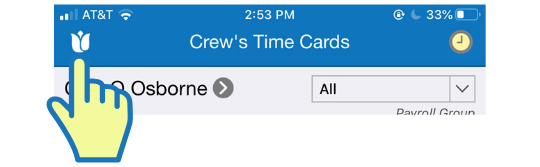
Selecting the icon slides the menu from the left of the screen.
Root Menu
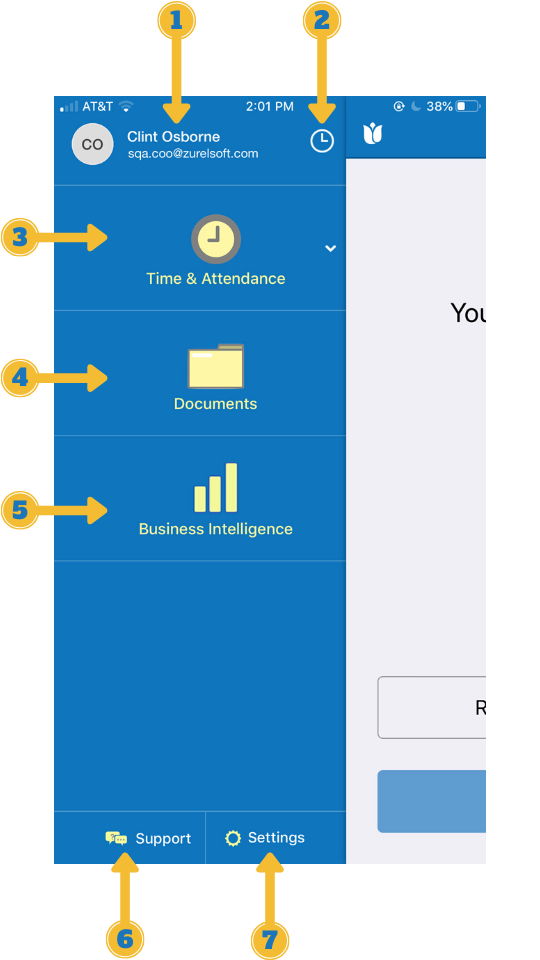
- User's Name and Username: Shows the full name and the username of the signed-in user.
- Clock Icon: Selecting it open's CICO (Clock-in/Clock-out) interface of the signed-in user.
- Time & Attendance:
Selecting it expands Time & Attendance menu. - Documents:
Selecting it opens the Documents section. - Business Intelligence
Selecting it opens the Insights section. - Support
Selecting it opens the Support section - Settings
Selecting it launches the Settings section.
Comments
0 comments
Please sign in to leave a comment.